
Best AI chatbots for technical documentation (2026)
A buyer comparison of documentation-focused chatbots, documentation platforms, broader AI agents, and build-your-own routes.
There is no single best AI chatbot for every documentation team.
The right choice depends on what you already publish and how much of the system you want to operate. You might want a documentation-focused chatbot for an existing docs site, AI built into a new documentation platform, a broader agent that works across support and other workflows, or a system your engineering team builds itself.
We build Biel.ai, so read our assessment with that commercial interest in mind. We reviewed public product and pricing information on 2026-08-13.
Use this comparison to build a shortlist, then test the products against the same documentation before you buy.
Choose the route before choosing a vendor
| If your team needs | Route to evaluate | What to establish during a trial |
|---|---|---|
| Chat and search for documentation you already publish | Documentation-focused chatbot | Can it index your real sources, show useful evidence for an answer, and handle a question your docs do not answer? |
| A new documentation platform with AI built in | Documentation platform | Does the platform meet your publishing needs, and does the plan include the AI features you need? |
| An AI agent that works across docs, support, and other workflows | Broader AI agent | Can it handle technical documentation with the source evidence and retrieval behavior your team needs? |
| Full control over retrieval, models, permissions, and deployment | Build with a framework | Who owns ingestion, evaluation, monitoring, access control, incident response, and maintenance? |
Products in these categories overlap, but they solve different buying problems. Choose the route first, then compare products within it.
How we compared the options
We selected products that represent different buying routes and have public product or pricing information available for review.
For each option, we looked at its product scope, pricing model, and the questions a buyer still needs to answer during a trial. Prices and plan details below were checked on 2026-08-13.
Answer quality, source coverage, citation behavior, privacy controls, and deployment fit depend on your sources, plan, and configuration, so test those with your own documentation.
Comparison table
| Product | Route | Chatbot pricing checked on 2026-08-13 | Best for | What to verify |
|---|---|---|---|---|
| Biel.ai | Documentation-focused AI assistant | Starter $50/month, Professional $150/month, Business $400/month. Chatbot included from Starter. 14-day no-card trial. | Teams that want to keep their existing docs stack, start self-serve, and add chat, search, MCP, or API access with implementation help available when needed. | Index representative sources, review answers against canonical pages, and confirm the plan features you need. |
| Mintlify | Documentation platform | Starter is free, but Assistant requires Pro. Pro is $540/month or $450/month billed annually. Enterprise uses custom pricing. | Teams choosing or replacing their documentation platform and wanting AI in the same stack. | Confirm the shared credit budget for Assistant, Agent, and automations, plus migration work and the publishing workflow. |
| GitBook | Documentation platform | Free and Premium tiers are available, but AI Assistant is on Ultimate, starting at $249/site/month on annual billing, plus $12/user/month. | Teams already using GitBook or considering it as their documentation platform. | Confirm the exact AI Assistant capabilities, source behavior, usage limits, and citation requirements. |
| Chatbase | Broader AI agent | Free; Hobby $32/month; Standard $120/month; Pro $400/month on annual billing; Enterprise custom. | Teams that want one customer-facing agent across documentation, support, websites, and integrations. | Test technical-doc ingestion, reader-visible source evidence, integrations, and analytics for the plan you would use. |
| Inkeep | Broader AI agent | Open Source is free. Enterprise uses custom pricing. | Teams building agents that may span documentation, support, in-product experiences, and other workflows. | Establish what your team will build and operate, what the platform provides, and how documentation retrieval behaves in the final implementation. |
| LangChain or LlamaIndex | Build-your-own framework | Not directly comparable to a hosted chatbot subscription. Budget separately for models, retrieval, hosting, observability, and engineering. | Engineering teams that need full control over the application. | Assign ownership for retrieval, evaluation, permissions, monitoring, incident response, and ongoing maintenance. |
Biel.ai billing update, October 15, 2026: included plan allowances are unchanged. Pay for extra usage beyond your included monthly interactions, with an optional spending limit in your dashboard. See pricing for plan details and your dashboard for extra-usage rates. The competitor review dates above are unchanged.
Choose a documentation-focused chatbot for an existing docs stack
If you already have a documentation site and want to add AI without migrating your publishing platform, a documentation-focused chatbot is the most direct route.
Biel.ai is built for this model. You can connect the documentation you already publish, start with a self-serve trial, and add chat, search, MCP, or API access depending on the plan and workflow you need.
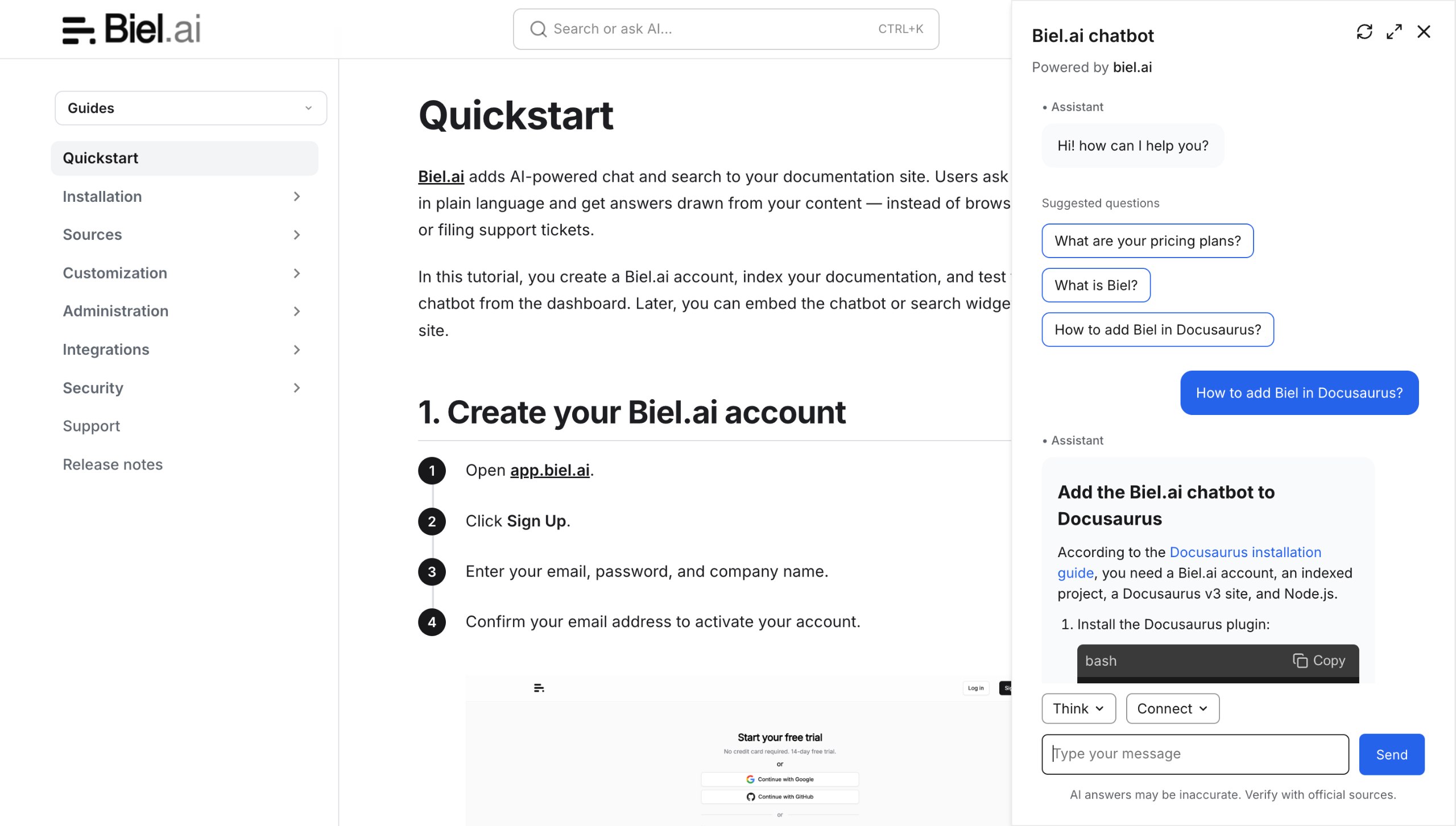
The Quickstart covers adding sources, indexing them, testing the chatbot, and choosing how readers or tools access the project.
You can configure Biel.ai yourself, or book a demo if you want help reviewing your documentation setup, integrations, pricing, deployment options, or implementation requirements.
The products differ in pricing, source support, deployment channels, analytics, integrations, and how they present evidence for an answer. Test those differences with the same documentation rather than choosing from feature pages alone.
Choose a documentation platform when publishing is part of the decision
Mintlify and GitBook combine AI features with the platform used to author, host, and publish documentation.
That can make sense when you already use one of those platforms or are planning a documentation-platform migration.
It is a different decision from adding AI to an existing Docusaurus, MkDocs, Sphinx, or other docs stack.
Evaluate the AI features as part of the whole platform decision. Migration work, redirects, authoring workflow, versioning, governance, and pricing may matter more than the chatbot itself.
Consider a broader AI agent when support is your main use case
A broader AI agent such as Chatbase or Inkeep may be a better fit when the main goal is handling customer-support conversations across a website, help centre, and support workflows.
If answering questions from technical documentation is the main goal, a specialised docs product is usually the more direct fit. It can focus on retrieving answers from canonical documentation, showing source evidence, and identifying content gaps, while still making that documentation available to other systems through an API or MCP connection.
This lets teams separate responsibilities. A support or product agent can handle the broader workflow while a documentation-focused service handles retrieval from maintained docs.
If you evaluate a broader agent, test the documentation experience directly. Check whether it can use your canonical sources, retrieve a recently changed procedure, show useful evidence for an answer, and handle a question the documentation does not answer.
Build when control is a requirement your team can own
LangChain and LlamaIndex are software frameworks, not finished documentation chatbots.
They give engineering teams more control over retrieval, models, orchestration, permissions, interfaces, and deployment. That flexibility also means your team owns the resulting system.
Budget for more than framework or model costs. Someone must own source ingestion, evaluation, monitoring, access controls, observability, incident response, upgrades, and investigation of incorrect answers.
For a deeper comparison of that operating work, see self-hosted vs SaaS docs chatbots.
Run the same trial before deciding
Use the same documentation and questions for every product you shortlist.
- Choose three common questions that your documentation answers.
- Include one recently changed procedure.
- Add one question that the documentation does not answer.
- Connect or load the same source material for each candidate.
- Have the same reviewer check each answer against the canonical source.
- Record the plan, source setup, channel, evidence shown, and any important failure.
A useful trial should show whether your team can verify the answers and identify what needs fixing when something goes wrong.
For a fuller pre-launch review process, use how to evaluate a docs chatbot before you ship.
Frequently asked questions
What should we test during a docs-chatbot trial?
Use your current documentation and test common questions, alternate wording, a recently changed procedure, and something the documentation does not answer. Check the answer against the canonical source and inspect the evidence available to the reader.
How should a team test citations or source behavior?
Start with a question whose canonical page the reviewer knows well. Check whether the product gives the reader a useful source, whether it points to the current procedure, and whether the answer adds anything the source does not support.
Is self-serve or sales-led buying better?
It depends on how your team wants to evaluate the product. Self-serve products let you start testing immediately with your own documentation and published pricing. A sales-led process can make sense when you want a tailored commercial or implementation discussion before starting.
Is the cheapest plan the cheapest option?
Not necessarily. A hosted product has a visible subscription cost but may reduce engineering work. A framework may be free or open source while still requiring model usage, infrastructure, monitoring, and engineering time.
Compare the operating cost of the route, not only the license or subscription price.
Start with the route that fits your docs stack
If you already have a documentation site and want to add chat or search without changing how you publish, start with a documentation-focused product such as Biel.ai and test it against your real sources.
If you are also choosing a publishing platform, compare complete documentation platforms with built-in AI.
If customer support is the main use case, evaluate a broader support agent.
If full control over the system is a requirement, evaluate the build route separately.
If you want to try the documentation-focused route without a sales process, start a Biel.ai trial. If you want help reviewing your setup or requirements first, book a demo.
If anything in this comparison is out of date, tell us and we will re-check it.