
See which questions your docs can't answer
See which questions your docs can't answer. No more digging through conversations one by one. Plus, style your chatbot down to the last pixel.
Here's what we shipped in January:
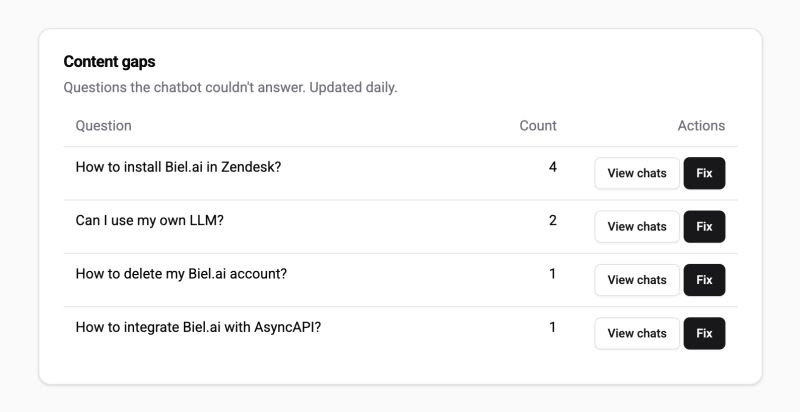
Advanced analytics: See what your documentation is missing
Your chatbot tracks every conversation. Now you can see patterns in what users ask, and where your docs fall short.
What's new:
- Frequently asked questions: See which questions come up most, automatically grouped by topic.
- Content gaps: Discover questions your bot couldn't answer, with AI-powered suggestions for what to add.
Advanced analytics is available on Professional plans and above.
Find it in Analytics > Chatbot tab.
CSS parts: style every detail of your chatbot
Before, you could change basic colors and fonts via a predefined set of properties.
Now you can customize any element inside the chatbot (buttons, message bubbles, search results, input fields) with our advanced mode overriding the CSS rules directly.
For more details, see CSS parts styling.
Metadata: Tag conversations the way you work
Add custom labels to conversations for better organization and reporting:
- Source
- User segments
- Product areas
- Support categories
Any custom dimension that fits your workflow. This makes it easier to build reports and connect Biel.ai with your existing tools.
See the new metadata property.
Referral program: Get 3 months free
Got a friend whose users can't find anything in their docs? Introduce them and get rewarded:
- You get: 3 months free when they subscribe (we pause your billing)
- They get: 1 month free trial (instead of the usual 15 days)
- Refer 4 teams: Get a full year free (any plan)
Questions about any of these features? Let us know. We'd love to hear how you're using them.
P.S. Content gaps analysis runs daily, so check back tomorrow to see what questions your docs should answer.