
How to add AI search to a developer portal
Why developer portals need AI search, how to add it across documentation websites, and the configuration choices that shape the search experience.
A developer portal can have accurate guides, a complete API reference, and sensible navigation while still making a task hard to find.
The problem appears when a developer knows the outcome they need but not the page name, product term, or documentation path that explains it.
AI search gives developers another route into the documentation. It can connect task-oriented language with relevant pages without replacing navigation or inventing information that the documentation does not contain.
This guide shows how to add Biel.ai search to a developer portal and make the first useful configuration choices. If you want a deeper guide to combining several documentation websites into one search experience, see how to add one search across multiple documentation sites.
Why a developer portal needs AI search
Developer portals are usually organized around the product structure the team already knows. Developers often arrive with a task instead.
They may need to choose an authentication flow, find the reference for an error, configure an SDK, or connect a setup guide to the first successful request.
AI search can help when the right page exists but the developer does not know what it is called or where it lives.
| Portal problem | What AI search can do | What still needs attention |
|---|---|---|
| A developer cannot name the right page | Match the query with relevant documentation pages | Clear page titles, terminology, and navigation |
| A task spans guide and reference content | Surface useful pages from both areas | A clear path between the pages |
| Older and newer pages overlap | Prioritize useful pages when the source content is sound | Updating or retiring obsolete content |
| The documentation does not cover the request | Avoid presenting unrelated pages as a useful result | New documentation or an appropriate support route |
AI search improves access to documentation that already exists. If the source itself is missing or wrong, fix the documentation first.
Add the documentation sites you want to search
Create a Biel.ai account, create a project, and add the documentation websites you want developers to search.
Depending on your developer portal, that might include:
- product documentation
- API references
- SDK documentation
- integration guides
- knowledge bases
- documentation for several products or services
Add those websites as URL or sitemap sources, then wait for Biel.ai to index the content.
The search widget searches indexed website content. Other project source types, such as files, GitHub repositories, OpenAPI specifications, or Confluence content, can be available to chatbot answers but do not appear in search results.
See the Sources overview for current source types and the Search documentation for search setup and limitations.
If you are combining several documentation websites and need more guidance on cross-site relevance, see how to add one search across multiple documentation sites.
Install search where developers already look
Add the Biel.ai search widget where developers already expect to search the portal.
The widget uses semantic search to rank indexed website pages using the query together with signals from page content, titles, metadata, and URL structure.
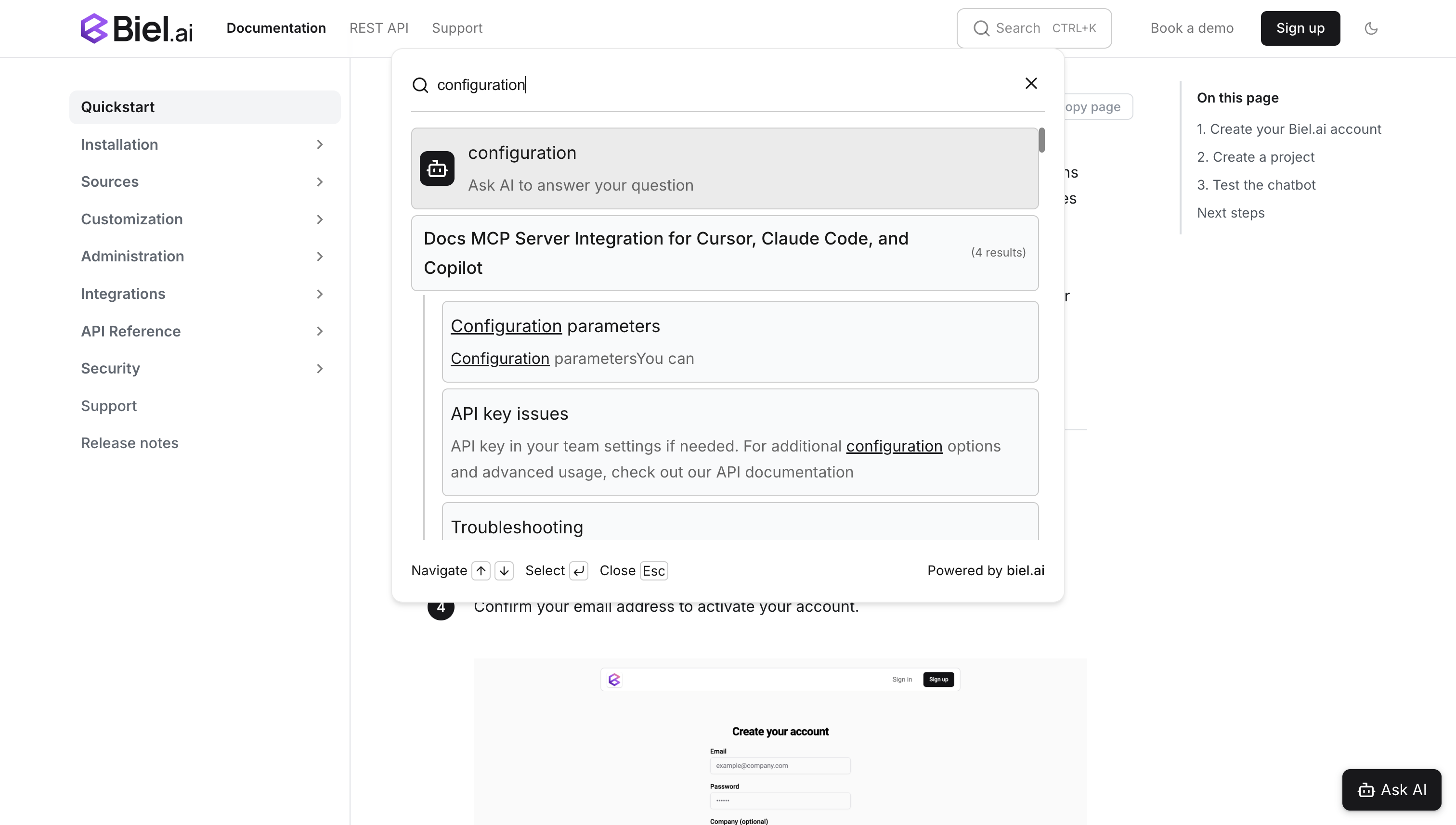
A developer can enter a task-oriented query, scan the ranked pages, and open the relevant documentation without first knowing where that page lives in the navigation.
Use the Search documentation for current installation options.
Keep normal portal navigation available alongside search. Browsing and task-oriented search solve different needs.
Customize results when the defaults are not enough
Start with the documentation itself before changing search settings.
Clear titles, descriptions, terminology, and stable URLs make it easier for search to return the intended page.
Then use the smallest configuration change that solves the problem.
| If developers need | Use | Best for |
|---|---|---|
| A way to narrow results to guides, API reference, or tutorials | Search filters | Letting the reader choose a useful category |
| A current task guide to rank above less useful material | Boost scores | Changing default result priority |
| Search that matches the portal UI | Widget customization | Position, appearance, and labels |
Biel.ai search filters narrow results using URL patterns. Boost scores can raise or lower the relative priority of pages in the default ranking.
Use filters when several groups of results are valid. Use boosts when the right page exists but needs a different priority.
Do not use either to hide outdated or conflicting documentation.
See the Search documentation for metadata and boost configuration, Search filters for filter setup, and the widget customization documentation for appearance and layout options.
Fix the documentation before forcing the ranking
A weak search result does not always mean the search configuration is wrong.
If a current page ranks too low, first check its title, terminology, metadata, and surrounding content.
If search returns two pages with conflicting instructions, decide which page is current and fix the documentation. A boost score should not be responsible for deciding which technical procedure is true.
If the topic is not documented at all, adding filters or ranking rules will not solve the underlying problem.
Search should make good documentation easier to reach, not compensate for content that needs repair.
Add chat when it helps the same workflow
Search and chat solve related but different problems.
Search helps a developer find and inspect a documentation page. Chat can help when the developer has a question that needs an explanation grounded in one or more indexed sources.
If you offer both, make the handoff clear.
For that pattern, see why documentation search needs an Ask AI button.
Frequently asked questions
Can Biel.ai search a developer portal built from several documentation websites?
Yes. Add the websites you want to search to the same project as URL or sitemap sources.
For choosing which sites to combine and tuning cross-site results, see how to add one search across multiple documentation sites.
Can the search widget search uploaded files or GitHub repositories?
No. The search widget indexes website content only. Other project source types can support chatbot answers but do not appear in search-widget results.
Should a developer portal use search filters or boost scores?
Use filters when developers need to narrow a broad result set themselves.
Use boost scores when a page or section should have a different default priority.
Fix outdated or conflicting documentation before changing ranking.
Does AI search replace developer portal navigation?
No. Navigation remains useful for readers who know where they are going. AI search gives developers another route when the language of their task does not match the portal structure.
Add AI search to your developer portal
Create a Biel.ai account, add the documentation websites you want to search, and install the search widget where developers already look.
Start with the default results. If useful pages are difficult to find, improve the documentation first, then use filters or boost scores where they make the search experience clearer.