
How DevRel teams measure time to first API call
A practical method for defining time to first API call, finding onboarding friction, and comparing changes against your own baseline.
Time to first API call measures how long it takes a developer to go from the start of onboarding to their first successful request. It is useful because it gives DevRel teams one concrete onboarding milestone to define, inspect, and improve.
A slow first call can come from many places: credentials, provisioning, unclear documentation, a confusing API flow, or a product problem. The metric does not tell you the cause by itself.
This guide shows how to define the event, find documentation friction around it, and compare changes against your own baseline.
Define what counts as the first successful API call
Start with an event your team can measure consistently.
For example, you might define success as:
- a developer sends a specific API request
- the request uses valid credentials
- the API returns the expected successful response
- the event occurs within a defined onboarding window
Also decide when the clock starts. Depending on your product, that might be account creation, API-key creation, entry into the quickstart, or another onboarding event.
| Define | Example |
|---|---|
| Start event | Developer creates an account |
| Successful event | First request returns the expected successful response |
| Measurement window | First 24 hours after account creation |
| Exclusions | Internal testing, known incidents, duplicate accounts |
| Owner | Team responsible for validating the metric |
Use a definition that fits your own API.
Do not compare your number with a universal target without considering the onboarding path. An API that requires provisioning or approval will naturally have a different first-call journey from one that issues an API key immediately.
Find where the onboarding path breaks
Once the event is defined, look at the steps a developer must complete before the first successful request.
A typical path might include:
- create an account
- obtain credentials
- choose the correct authentication method
- install an SDK or prepare a request
- find the correct endpoint and parameters
- send the request
- understand the first error, if it fails
For each step, ask whether the documentation gives the developer a clear next action.
| What you observe | What to investigate |
|---|---|
| Developers struggle to find the setup page | Titles, navigation, search, and terminology |
| Authentication causes repeated confusion | Whether the guide clearly explains which flow to use |
| Developers move between several pages before making a request | Whether the quickstart needs a clearer path between setup and reference content |
| The first request fails with a common error | Whether the error and recovery step are documented |
| Documentation gives conflicting instructions | Which page is current and which should be updated or retired |
| The product requires an undocumented step | Whether the docs need to be updated or the product flow needs attention |
Time to first API call tells you that onboarding is slow. This review helps you identify where documentation may be contributing to the delay.
Use developer questions to find friction
Developers often describe the task differently from the way your documentation is organized.
They may ask:
- Where do I get my API key?
- Which authentication method should I use?
- Why am I getting a 401?
- What is the smallest request I can send?
- Which base URL should I use?
- Why does the quickstart example fail?
Those questions are useful evidence when reviewing the onboarding path.
With Biel.ai, you can index your documentation and test representative onboarding questions before exposing the chatbot to readers. See the Quickstart for project setup, source indexing, and testing.
The useful check is whether the assistant helps the developer reach the current documentation and take the next valid step.
If the source is missing, incomplete, or wrong, fix the documentation rather than expecting the assistant to fill the gap.
Use recurring unanswered questions to spot documentation gaps
After launch, recurring questions can show where developers continue to struggle.
Biel.ai Analytics groups common questions and Content Gaps by semantic similarity. Content Gaps are questions the chatbot could not answer from the indexed documentation.
For onboarding, those clusters can point to issues such as:
| What appears repeatedly | What to check |
|---|---|
| Credential questions | Whether credential creation and use are explained clearly |
| Authentication errors | Whether the correct flow, scopes, and common failures are documented |
| First-request questions | Whether the quickstart gets from setup to a working request clearly |
| SDK setup questions | Whether installation and initialization steps are complete |
| Questions the docs cannot answer | Whether information is missing or the request belongs with support or product |
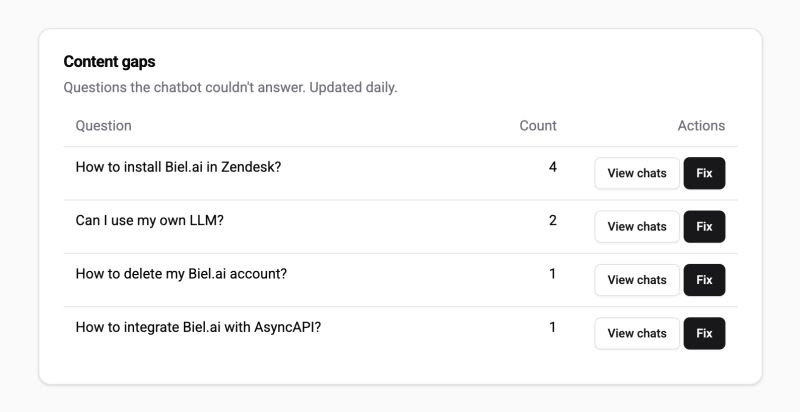
Treat these as leads, not automatic diagnoses. Read the relevant documentation and decide what actually needs to change.
Content Gaps and common-question analysis run daily and are available on Professional, Business, and Enterprise plans. See the Analytics documentation for current plan and data-availability details.
For a broader workflow, see how technical writers use chatbot analytics to improve documentation quality.
Compare against your own baseline
Once you change the onboarding documentation or flow, compare time to first API call with the baseline you defined earlier.
Keep the event definition consistent.
Record other changes that could affect the result, such as:
- a new authentication flow
- faster account provisioning
- a product release
- SDK changes
- search changes
- support interventions
- changes in developer traffic or acquisition source
If several things changed at once, do not attribute the entire improvement to documentation.
The most useful comparison is usually your own onboarding flow before and after a specific change, using the same success event and a comparable developer cohort.
Look beyond the average
An average can hide important differences.
A small number of developers who take much longer than everyone else can distort the result, while an average among successful developers can hide people who never make a first call at all.
Depending on your traffic, also consider:
- median time to first API call
- the percentage of developers who make a successful call within a defined window
- the distribution of first-call times
- the share of developers who never reach the first successful request
These measures answer different questions. Time to first API call tells you how long successful onboarding takes. A completion rate tells you how many developers reach that milestone at all.
Use the same success-event definition when comparing them.
Treat it as an onboarding metric, not a docs-only KPI
Documentation can affect time to first API call, but it is only one part of the journey.
A developer may also be delayed by:
- account approval
- credential provisioning
- authentication behavior
- SDK bugs
- API reliability
- sandbox availability
- product configuration
- support response time
If the documentation is clear and the developer is waiting for provisioning, rewriting the quickstart will not fix the metric.
Use time to first API call to identify onboarding friction, then determine which part of the journey actually needs work.
Frequently asked questions
What is time to first API call?
It is the elapsed time between a defined onboarding start event and a developer's first successful API request. Define both events before comparing developers, cohorts, or periods.
Is time to first API call the same as activation rate?
No. Time to first API call measures duration. Activation rate measures the percentage of a defined cohort that reaches the successful-call event within a defined period. Both can use the same success event.
What is a good time to first API call?
There is no universal target. The useful baseline depends on your API, onboarding requirements, provisioning model, authentication flow, and developer audience. Start with your own current distribution and improve from there.
Can an AI documentation assistant reduce time to first API call?
It can help developers find and understand maintained documentation during onboarding, but it cannot guarantee a shorter first-call time. Measure the onboarding event before and after changes, and account for product, credential, support, and other changes that may affect the result.
When should DevRel revisit the metric?
Revisit it after a meaningful change to onboarding documentation, authentication, SDK setup, provisioning, search, or another part of the first-call journey.
Use enough comparable journeys to make the review useful rather than treating a short-term fluctuation as a lasting result.
Start with one first-call journey
Define one successful API request and the event that starts the clock. Walk through the onboarding path, identify where developers struggle, make one defensible improvement, and compare the result with your own baseline.
If you want to test whether developers can reach the right documentation through AI-powered chat, create a Biel.ai account and follow the Quickstart to index your documentation and test representative onboarding questions.