Why your documentation search needs an Ask AI button

Nova C. ·

Most documentation searches end in a list of links, not an answer. The reader scans the titles, clicks one, realizes it's close but not right, hits back, and tries a different phrase. We watch this loop play out across hundreds of docs sites, and it's the single biggest reason people give up and file a ticket.

An Ask AI button ends the loop without forcing a choice. It sits inside the same search box and offers a second path: instead of opening pages, get a direct answer synthesized from your docs, with citations. This is a deep dive on why that button matters, how the search-to-chat handoff works, what we measure, and where it falls short.

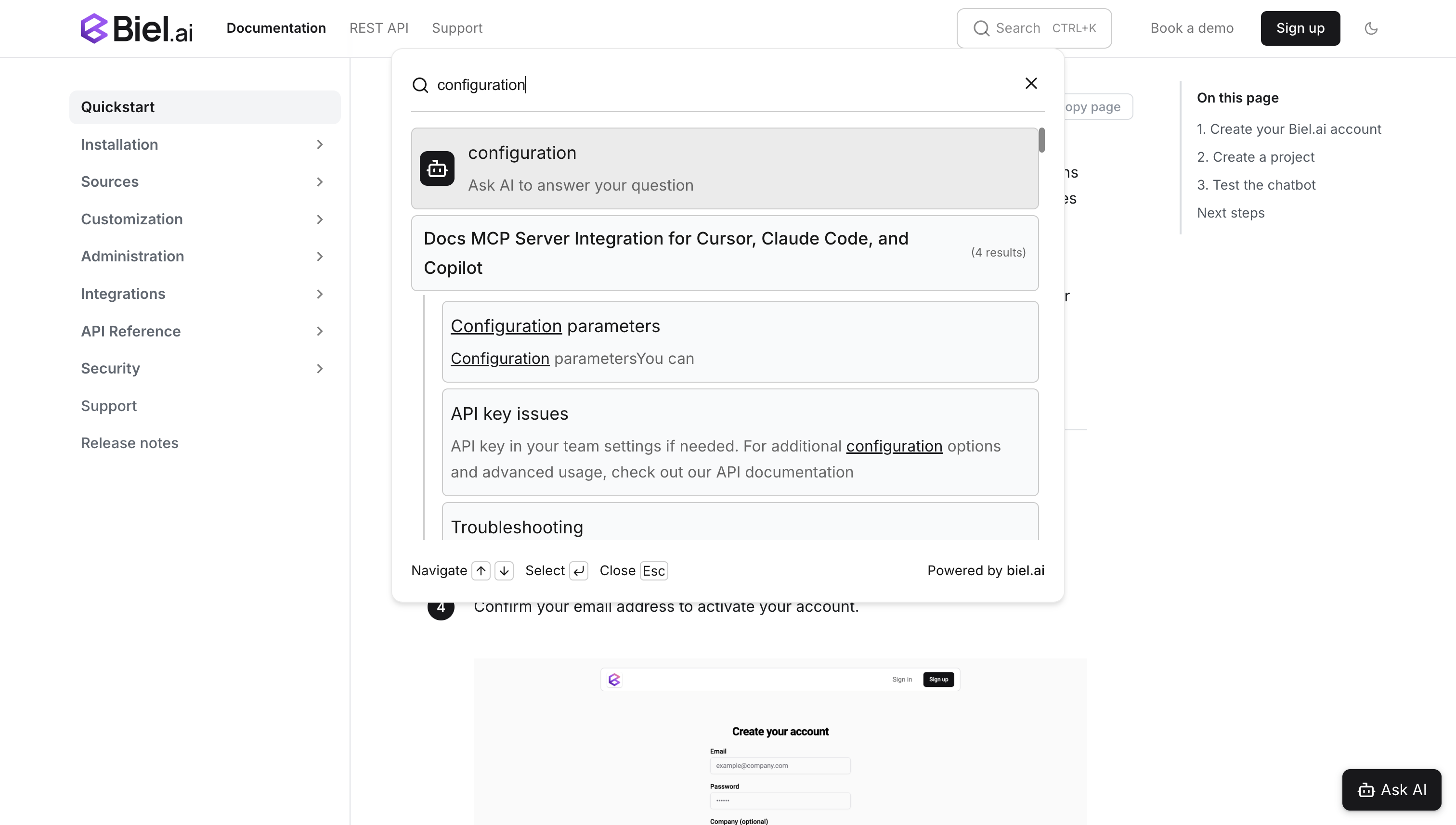
Search widget showing the Ask AI button at the top of results, offering to answer the query directly

Search and AI chat answer different questions

Search and AI chat are not competitors; they answer two different kinds of questions, and most docs sites have both. Keyword search is built for navigational intent: the reader knows the page exists and wants to land on it. "Where is the webhooks API reference?" is a search query, and a good index returns the right page in one keystroke.

AI chat is built for informational intent, where the answer lives across several pages and needs to be assembled. "How do I configure retry logic for failed webhooks?" is not a page; it's a synthesis of the webhook config reference, the retry table, and a troubleshooting note. RAG (retrieval-augmented generation, which retrieves the most relevant doc chunks and generates an answer from them) exists precisely for that second case.

The mistake is treating this as an either/or platform decision. Your readers don't have one kind of intent. They have both, often in the same session, and the tool should follow the question rather than the other way around.

An Ask AI button lets the reader pick per query

An Ask AI button is a control inside the search results that hands the current query to your chatbot instead of returning more links. The reader types once and then decides, per query, whether they want a page to open or a question to be answered.

That per-query choice is the whole point. A platform decision happens once, at install time, by someone who can't predict what every future reader will ask. The Ask AI button pushes the decision down to the person who actually has the intent, at the moment they have it. Navigational lookups stay in search; "how do I" and "why won't this work" questions go to chat. Nobody has to be told which is which.

It also removes the dead end. Today, a search that returns weak results is where self-service ends. With the button, a weak result set is not the end of the road, it's one click from a synthesized answer that pulls from pages the reader never would have thought to open. For more on why that matters across a multi-product setup, see how we handle search across multiple documentation sites.

The handoff carries the query so the reader never re-types

The technical job of the Ask AI button is to move a query from the search context into the chat context without losing it or breaking the page. When a reader types in the Biel.ai search widget, two things render together: the keyword-matched results, and an Ask AI control at the top pre-loaded with what they typed.

Click a result and you navigate to the page, as always. Click Ask AI and the search modal closes, the chat widget opens on the same page, and the query is already submitted. The two widgets talk to each other through browser events, so there is no new tab, no context switch, and no re-typing. The chatbot then runs RAG over your indexed docs and returns an answer with source links the reader can verify.

The detail that matters here is "same page." The reader's place in your docs is preserved; the answer arrives in an overlay, not a redirect. That continuity is what makes the button feel like part of search rather than a separate product bolted on.

What the search-to-chat ratio tells you about your docs

Across the sites we run, roughly 15 to 25 percent of searches end in an Ask AI click, and the exact ratio is a diagnostic worth reading. API references and config tables sit at the low end, because their readers are navigating to a known page. Conceptual guides, tutorials, and troubleshooting content sit higher, because their readers are asking questions that span pages.

When a reader chooses Ask AI over the visible results, that choice is a signal, and it splits two ways. If the chatbot then answers the question well, your content is solid but your search ranking buried it: a retrieval problem. If the chatbot struggles too, you have found a genuine content gap, a question your docs don't actually cover.

We surface both patterns automatically through Content Gaps analytics, which clusters the questions readers ask and flags the ones your docs answer poorly. This is the part teams underuse. The button is not just a UX nicety; it's a continuous stream of evidence about what to write next. If you're trying to separate "the bot is broken" from "the docs are thin," our guide on how to tell if your documentation chatbot is actually working walks through the metrics we trust.

When you actually need both, and when you don't

Not every docs site needs both search and chat, and we'd rather tell you that than sell you the pair. Here is the framing we use.

Your docs are mostly…What worksWhy
Reference (API specs, config tables, parameter lists)Search aloneReaders know the page they want; synthesis adds little
A small set of "how do I" contentChat aloneThe bot can cover everything; a search index is overhead
A mix of reference, guides, tutorials, troubleshootingBoth, with Ask AISearch handles "find," chat handles "explain," the button connects them

Most developer documentation is the third row. It mixes reference material people navigate to with conceptual and troubleshooting content people ask about, and the Ask AI button is what keeps those two modes in one box instead of two disconnected widgets.

You can tune or hide the button

The Ask AI button is configurable through attributes on the search widget, so you are not stuck with one look or one behavior. You can switch the icon style to bot, sparks, or question-mark and rewrite the prompt text:

<biel-search
  project="your-project-id"
  ai-icon="sparks"
  ai-result-fragment="Let AI answer your question"
/>

You can restyle it through CSS custom properties to match your brand, or hide it entirely with hide-ask-ai-button="true" if you want search-only behavior on a reference-heavy site:

biel-search {
  --biel-search-ask-ai-bg-color: #4f46e5;
  --biel-search-ask-ai-color: #ffffff;
  --biel-search-ask-ai-border-radius: 12px;
}

The button supports full keyboard navigation: a reader can arrow down to it from the search input and press Enter. That matters for accessibility compliance and for the power users who never touch the mouse.

The honest limits

The Ask AI button won't fix docs that don't cover the topic. If the answer isn't in your content, RAG can't invent it, and a confident-sounding wrong answer is worse than an empty result set. The button surfaces those gaps faster, but closing them is still writing work.

It also won't rescue a broken search index. If your keyword results are poor, more readers route to chat, which masks the retrieval problem instead of fixing it. Read the search-to-chat ratio as a symptom, not a cure: a spike toward chat often means search needs attention. And the handoff depends on both widgets being present. On a site running search without a chatbot, the button has nowhere to send the query, so you need both installed for the flow to work at all. None of this is a reason to skip the button; it's a reason to pair it with content and search work, which is the same advice we give about improving the user experience of an AI chatbot on your docs.

Frequently asked questions

No. The button adds a path; it doesn't remove one. Keyword search still handles navigational queries, where the reader wants a specific page, faster and more cheaply than an AI answer. The button only takes over when the reader decides their question needs synthesis. The two coexist in the same box.

Will it slow down the search experience?

No. The button renders alongside results immediately and only invokes the chatbot when the reader clicks it. There is no extra latency on a normal search, because the RAG call happens after the handoff, not before. Readers who never click Ask AI get the same search speed they always had.

How is this different from just adding a chatbot?

A standalone chatbot is a separate destination the reader has to think to open. The Ask AI button lives where readers already are, the search box, and forwards the query they already typed. It captures the moment a search comes up short, which is exactly when readers are most likely to give up or file a ticket. A chatbot off in the corner misses that moment.

What if the chatbot gives a wrong answer?

It can, when your docs are thin or contradictory on a topic. Every answer ships with source citations so readers can verify it against the underlying pages, and the questions where the bot struggles show up in Content Gaps analytics so you can fix the content behind them. The button makes weak spots visible faster; it doesn't hide them.

Getting started

If you're already running the Biel.ai search widget, the Ask AI button is on by default and connects to your chatbot automatically, no configuration required. If you run search without a chatbot yet, adding the chat widget alongside it enables the handoff through the browser events the two widgets share.

The result is a docs experience where every reader has two paths to an answer, browse or ask, and chooses the right one for the question in front of them. You can try Biel.ai free for 14 days and watch the search-to-chat ratio tell you what your docs are missing.

Try me ↓